Invoice profile, VAT ID, and tax
Your address changes, a document should go to another address, or you order from another EU country.
4 minute readBillingUpdated: 10/25/2026
On this page
Before you start
- For
- Owners who maintain their organization’s invoice data.
- Prerequisite
- Owner role. Without this permission, the portal says “Owners change billing data.”
- Where in the portal
- Billing › Payment tab › Invoice profile › Change
After this page, your invoice profile is complete in the portal, your VAT ID is entered for checking, and you know which VAT appears on your document.
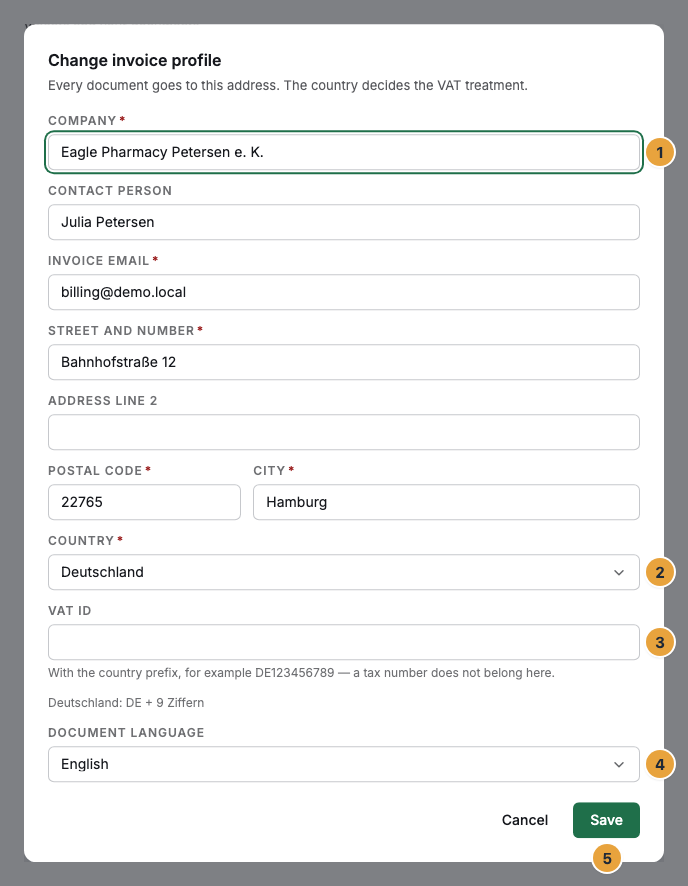
Every document goes to this address, and the country decides the VAT. If details are missing, no invoice is created: The section says “For your invoice we need company, address and country.” and offers Fill in invoice profile.
Steps
Enter company, address, and document language
- Open Billing, switch to the Payment tab, and click Change next to the Invoice profile. From within a running order, the same fields are in section 2, Invoice profile.
- Fill in the sheet Change invoice profile: Company, Contact person, Street and number, Address line 2, Postal code, City, Country. If a required field is missing, the sheet counts the ones still open.
- Enter the Invoice email and choose the Document language: German or English.
- Click Save.
Szenera assigns the Customer number with the profile. Before that, it says “assigned with the profile”.
Enter the VAT ID and have it checked
- Enter the number in the VAT ID field. Next to it is the pattern of your country.
- Save. The check runs in the background with the European register: “We are checking the number with the EU register.”
- If the checking service does not answer, start the check again with Check now.
The status appears next to the field:
| Status | What it means |
|---|---|
| checked | Confirmed in qualified form, with the day of confirmation. From now on, the reverse charge applies. |
| format checked | The pattern matches. In Germany, this is the final status, since the number has no tax effect there. |
| not confirmed | The member state does not know it. Until this is clarified, no order from another EU country is possible. |
| check running | The lookup service does not answer. Szenera asks again. A confirmation already given stays valid. |
A confirmed number is checked again after ninety days, in the background and without consequences for your orders.
Options
Which tax appears on your document
A single case decides, and the document names it:
- Germany: 19% VAT, shown separately, without additional text.
- EU with a confirmed VAT ID: 0% and the note “Reverse charge — the recipient is liable for VAT”. You owe the tax in your country. Your number appears on the document with the day of confirmation.
- EU without a confirmed number: no order possible. “Our offer is addressed exclusively to businesses.”
- Outside the EU: not taxable in Germany, no German VAT.
How prices are shown
Individual prices are shown net, with “plus VAT” as a footnote. Every total is built up in steps: items, Subtotal (net), VAT, Total (gross). The gross amount appears exactly once, as the number that is paid. Invoice amounts are gross amounts. What an order costs today, Szenera calculates pro rata from the order day to the end of the period, and the amount matches the invoice that follows to the cent.
Check the result
- The Invoice profile section shows company and address, Country, VAT ID, Invoice email, and Document language instead of the note about missing details.
- With a confirmed number, it says “checked on” with a date. The header of billing names your Customer number.
- The Next invoice preview shows VAT with a rate or Reverse charge 0 %.
If something goes wrong
| Symptom | Meaning | Solution |
|---|---|---|
| “VAT ID … was not confirmed.” | The member state does not know the number. | Check the spelling against the pattern and save again. |
| “The European register is not responding right now.” | The lookup is not reachable. | Do nothing. Szenera checks again before the invoice. Check now starts it immediately. |
| “VAT — the rate follows from your invoice profile” | The country is still missing. | Enter Country in the invoice profile. |
| “Our issuer master data is incomplete.” | Details are missing on Szenera’s side. | Wait for our reply. You can order right afterwards. |
| “Owners change billing data.” | Your account does not have the permission. | Ask an Owner of your organization. |
Related
- Master data of the organization — name, short name, and contact, which are not on the invoice.
- Invoices, credit notes, and documents — what the finished document looks like and where it is stored.
- Change your contract: displays, package, add-ons — the ordering path for which the profile must be complete.
Found what you needed? Then carry on in the portal — or set up an organization first.
Go to the portalTry it free