Order or reserve a player
A new display lacks the playback device, and you want to buy one or reserve one.
3 minute readBillingUpdated: 10/25/2026
On this page
Before you start
- For
- Owners who procure devices for their displays.
- Prerequisite
- Owner role.
- Where in the portal
- Billing › Players tab
After this page, you know what the Players tab shows and have reserved a model that is not yet available. You know the statuses of your orders and registered interests.
The Players tab lists the devices from Szenera with Model, Price, Status, and Action. The price is a unit price, “net, one-off”. It changes nothing about your ongoing payment. The status is available or coming soon. If nothing is on offer at the moment, the area says “No player is on offer right now.” Szenera gives twelve months of warranty on every device.
Steps
Order an available device
A model with the status available carries the badge available. The portal has no order dialog for it, and the Action column stays empty. If you want to order an available model, contact support. A running order then appears under Your orders and registered interests.
Reserve an announced device
- For a model with the status coming soon, click Register interest.
- The dialog Reserve a player promises that Szenera will get in touch as soon as the device is available. No order is created, no price is promised, and you can withdraw the reservation at any time.
- Under Your details, enter the Desired quantity and, if needed, a Note (optional), such as the intended location or a preferred date.
- Confirm your consent that Szenera may write to you once by email for this purpose.
- Click Reserve. “You are on the list” appears.
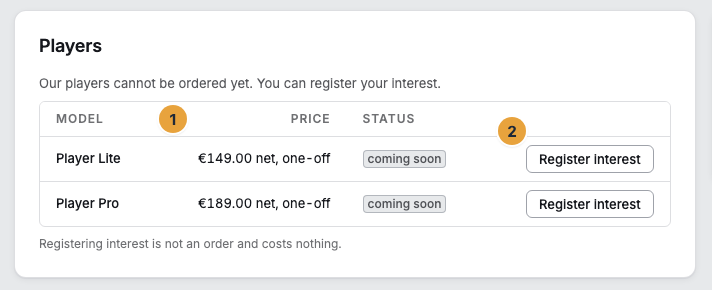
If a model is available, the Status column shows the badge available and there is no action.
Check the result
- Under Your orders and registered interests is the row with Number, Amount gross, and its status: Received, Confirmed, Shipped, or Canceled.
- A registered interest appears under Your registered interests with Quantity and Since as well as the status Confirmation pending, Registered, or Notified.
If something goes wrong
| Symptom | Meaning | Solution |
|---|---|---|
| “No player is on offer right now.” | No model is on offer at the moment. | Look again later or ask support. |
| “This model is no longer open for reservation.” | The model was removed from the reservation list. | Reload the Players tab and check the current status. |
| “The reservation could not be saved.” | Saving failed. | Open the dialog again and submit once more. |
| The Players tab shows no action. | Your account is not allowed to order. | Ask an Owner of your organization. |
Related
- Player Lite — what the entry-level model does.
- Unpack and connect — the way from the box to the first picture.
- Invoice profile, VAT ID, and tax — the address to which billing goes.
Found what you needed? Then carry on in the portal — or set up an organization first.
Go to the portalTry it free