Proofs and links for advertisers
The directory of closings, addenda, and interim statements, their files, delivery by email, and time-limited links for advertisers.
7 minute readAnalyticsUpdated: 10/25/2026
On this page
Before you start
- For
- Anyone who has to show an advertiser when and where their creative ran, for example an auto repair shop that shows a tire manufacturer the airtime of its creative.
- Prerequisite
- The permission View proofs, and for links Create and share proofs, both held by Owner and Manager by default. New proofs are created with direct business, meaning from the Premium package, or with participation in the ad network.
- Where in the portal
- Analytics › Proofs tab
At the end, you hold the proof for a month in your hands: signed, with a sequential number, as a PDF with an hourly log and a manifest. Your advertiser has received it by email, can verify it without an account, and can open their campaign report through a time-limited link.
You do not create a proof by hand. Each month of a booking is closed after the late-report window, and the proof is created from the closing, overnight into the fifth day after the end of the month. Whatever arrives after that appears in an addendum with its own number: Why is a gap not a zero?
Steps
Find and download a proof
- Open Analytics and switch to the Proofs tab. It lists all proofs, the newest first.
- Narrow down the list by ad campaign (All ad campaigns) and by kind: Closings, Addenda, or Interim. The ad campaign selection appears as soon as you run more than one ad campaign in direct business.
- Each row names the month and ad campaign, the number, the valid plays, the fulfillment, and signed … with a date. PDF opens the document, Verify opens the public verification page with this number, and Details opens the details of the proof.
- In the details, under Files, click Download to retrieve a file. The download link is valid for 15 minutes.
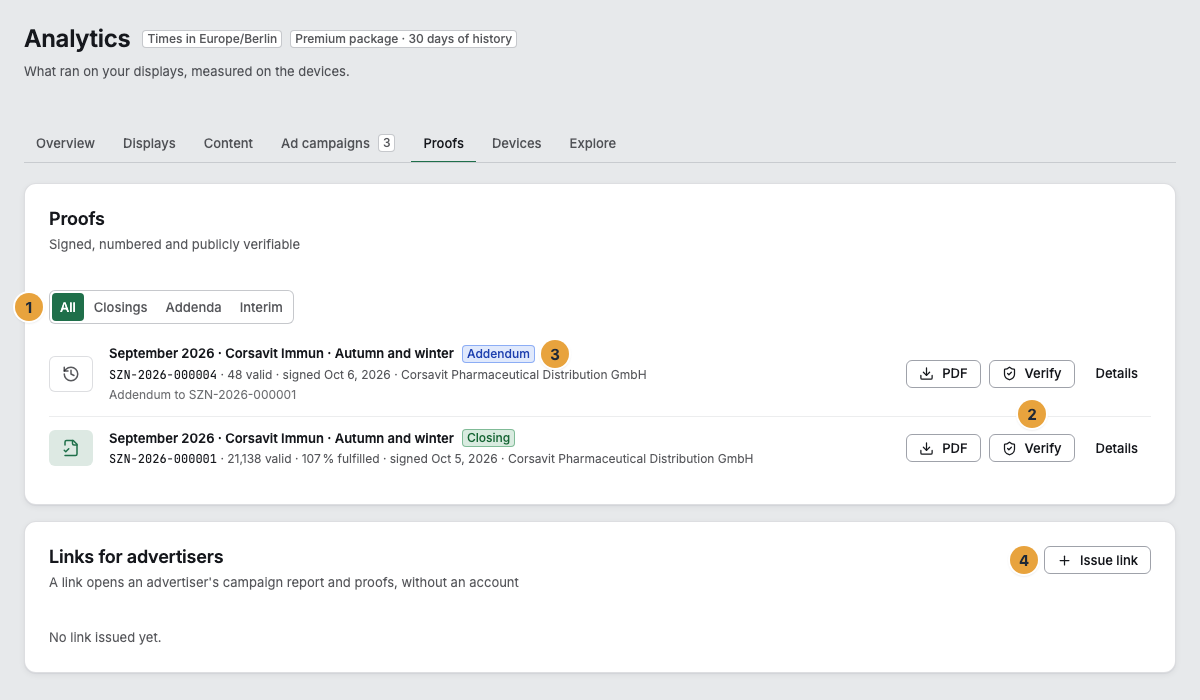
1 Filter by kind · 2 Closing with PDF, Verify, and Details · 3 Addendum with a link to its closing · 4 Issue link
Give an advertiser a link
A link opens an advertiser’s campaign report and proofs, without an account.
- In the Links for advertisers card, click Issue link.
- Choose the Advertiser and enter a Label that only you can see, for example the name of the agency that receives the link.
- Under Valid for, choose the duration: 30, 90, or 180 days, or 1 year.
- Click Issue. The address appears only this once. Click Copy and give it to your advertiser.
Revoke in the row of a link blocks it immediately: Anyone who has the address can open neither the report nor the proofs afterward. This cannot be undone.
The change log records both, with the person who did it: Advertiser link issued and Advertiser link revoked. The address itself does not appear there. A link that the delivery of a large proof creates is recorded the same way.
Options
What a proof contains
| File | Contents |
|---|---|
| Proof as PDF | Result, distribution by region, venue type, placement, and daypart, the creatives, the quality of the measurement, samples of the screenshots, the method with the rule and model versions and the limits of the measurement, plus the list of locations. The footer of every page carries the number, page, checksum, and check code. |
| Hourly log as CSV | One row per hour, display, and creative with plays, valid plays, airtime, and the verdicts. The Checksum of the figures is formed over these rows. |
| Signed manifest | The figures of the proof in machine-readable form, the checksums of all files and of the device batches it is based on, signed by Szenera. |
| Sample screenshots | Screenshots of randomly chosen plays, by default one per booking, display, and day, for closings only. Only what matches the planned sample is attached to the proof: a display that was supposed to show the booking on that day, shortly after the planned minute, at most 200 per proof. A screenshot shows the output of the display software, not the panel. |
The details of a proof also show:
- Contacts: only from audience data of grades A and B. If there were contacts from self-reported data, the note under the figure reads: “Contacts from self-reported data (grade C) do not count in this proof.”
- Verification: Check code, Signed, Key, Checksum of the figures, and Retained until. Szenera retains every proof for ten years.
- Delivery: who the email went to, as attachment or as link, and whether it is delivered.
- Measurement: how many device batches from how many devices the proof was built from, whether their Chain is complete, and whether every batch was signed.
- Creatives: which creatives ran, with the day they were approved.
- For a closing, the addenda to it. For an addendum, the closing it supplements.
Delivery by email
After every closing and every addendum, the proof goes to the contact persons of the advertiser for whom receives proofs is set: Create an advertiser. A PDF up to 5 MB is attached to the email. A larger one reaches the advertiser as a link that is valid for 90 days. Replies to the email go to the Owner of your organization. If an email does not arrive, Szenera tries again in the following nights, again with the PDF or a new link, at most five times in total.
Interim
An interim proof covers a running month up to yesterday, for example at mid-month. It carries its own number, is signed, contains no screenshots, and is not sent out by email. The portal does not request one itself today. If you work with the API, request it there, at most three times in ten minutes.
Check the result
- The verification page says Genuine and unchanged for the number and check code: Check a proof.
- In the details, under Delivery, every recipient appears with delivered.
- An issued link appears as valid with valid until …, and after it is first opened, with last opened ….
If something goes wrong
| Symptom | Meaning | Solution |
|---|---|---|
| No proof yet | No month of a booking has been closed yet. | The first proof is created overnight into the fifth day after the first month ends. |
| A proof is missing for a month. | The booking did not run in that month: Nothing was planned and nothing was shown, for example during a pause. After an ad campaign is canceled, the following months get no proof, and neither does a month that was already over when the booking was created. | Nothing to do. A month without delivery has nothing to document. |
| Proofs from the Premium package | Your organization neither has direct business in its package nor takes part in the ad network. | Compare packages or Join the ad network. |
| Proofs are not enabled for your role | Your account lacks View proofs. | An Owner grants the permission in the settings under Roles. |
| not signed on a proof | The proof was issued without a signature. The figures and checksums hold, but the origin is not proven. | Contact support. |
| Under Delivery, it says failed or lists nobody. | The email did not arrive, or nobody at the advertiser receives proofs. Szenera retries a failed email in the following nights, at most five times. | Check the addresses on the advertiser and give them a link. |
| Issue link is missing. | Only people who may manage proofs can issue links, and only with direct business in the package. | Permissions by role. |
| No advertiser yet in the dialog | Links apply per advertiser. | First create an advertiser under Advertising. |
| In the proof, a screenshot carries Sample no longer available. | The screenshot was no longer present at closing, could not be read, or was too large. It is not attached, and all other details hold. | Nothing to do. The proof states the number of such samples itself. |
| An addendum shows few plays. | It contains only what arrived after the closing, not the whole month. | Read the closing and the addendum together. |
Related
Found what you needed? Then carry on in the portal — or set up an organization first.
Go to the portalTry it free