Devices tab: machine metrics per device
CPU load, memory, and free storage over time, system image and last report per device, in every package.
4 minute readAnalyticsUpdated: 10/25/2026
On this page
Before you start
- For
- Everyone who wants to narrow down a fault, and everyone who needs to know before an ad campaign what state their devices are in.
- Prerequisite
- The permission Run ad hoc queries, held by Owner and Manager by default. A package with history is not needed here.
- Where in the portal
- Analytics › Devices tab
The Devices tab answers a different question from the others: not what ran, but whether the machines are healthy. Read it from top to bottom: first the figure row, then the trends, then the System image table with one row per device.
Devices, not displays
This tab lists devices, while all the others list displays: A device can drive two displays, and the machine values belong to the device. Which devices exist is stated by the System image table.
Why this tab is in every package
The devices report these values themselves, and they are tied to no history commitment. Devices therefore carries no package lock, and the reason is stated at the foot of the page: “These values are reported by the devices themselves. They are therefore available in every package.”
Earlier addresses of individual figures still exist and redirect to this tab. A bookmark does not run into nothing.
The figures
| Figure | What it counts | Where it appears |
|---|---|---|
| Reported operating time | How much of the observed time the devices reported as operating, as a share. The footer sentence: “Reported operating time divided by the observed time.” | Figure row |
| CPU load | The load average of the devices, a number without a percent sign: 1 equals one fully busy processor core, and a device with four cores reaches 4 under full load. The footer sentence: “Load average of the devices. 1 equals one fully busy processor core.” | Figure row and trend |
| Memory in use | How much memory was in use on the devices. | Figure row and trend |
| Free storage | How much storage space was free on the devices. | Figure row and trend |
| Status changes | How often devices changed their status. | Machine values trend |
Where nothing was reported, a dash appears with not measured yet below it. A zero would stand for a measurement nobody took.
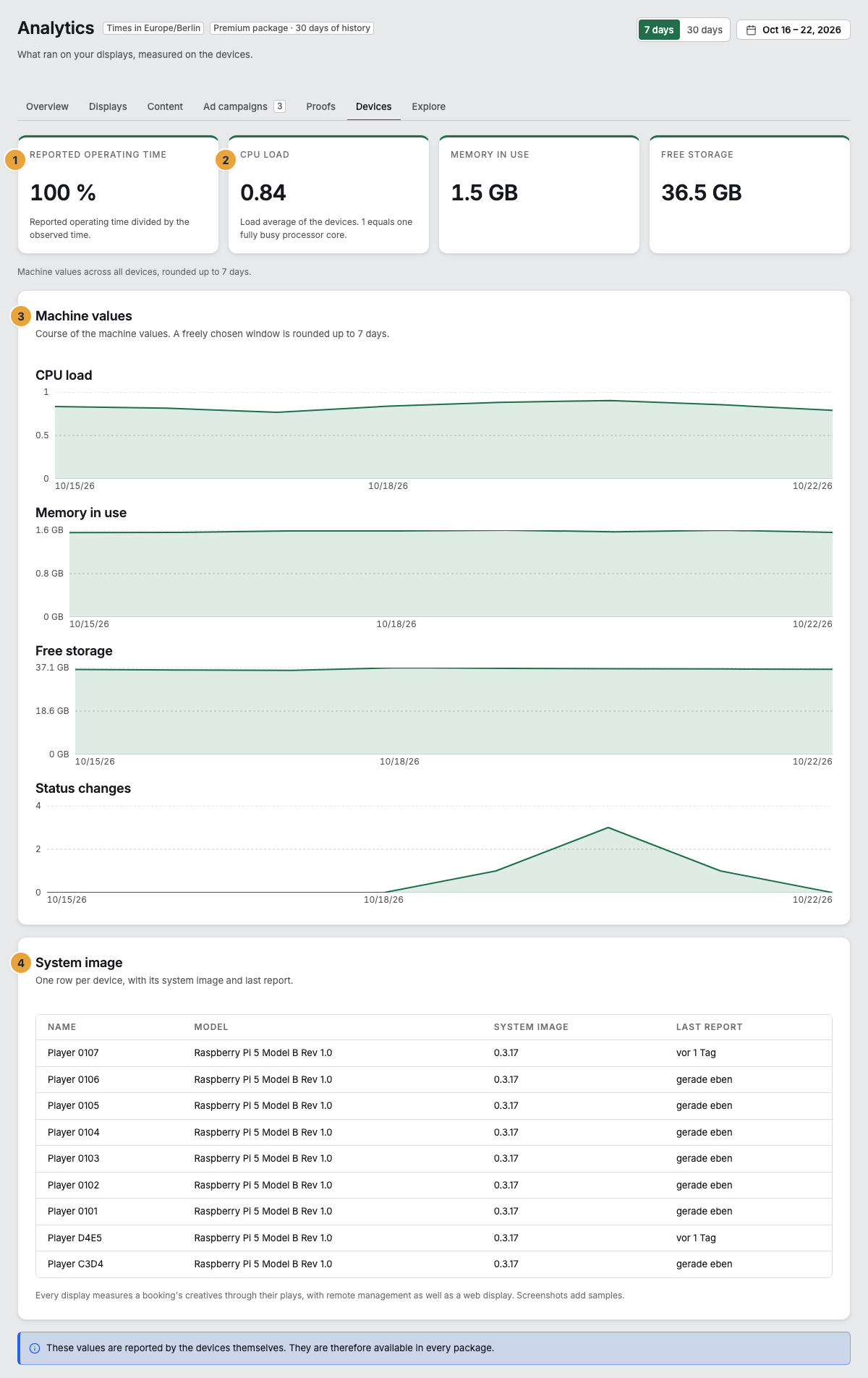
1 Reported operating time · 2 CPU load, memory, and free storage · 3 Machine values · 4 System image
The trend of the machine values
The card Machine values shows four curves over the same time axis for all devices together: CPU load, Memory in use, Free storage, and Status changes. Each curve has its own scale, because the four measure in three units. The exact time of a point appears when you hover over it.
The window is rounded: The machine values know only 7, 30, 90, and 365 days, and a freely chosen period is rounded up to the next larger one. The sentence under the card says so: “A freely chosen window is rounded up to … days.”
| Message | Meaning |
|---|---|
| No machine values yet | Not a single report exists for the period. When each device last reported is shown in the table below. |
| Without measurements in this period: names | A curve without measurements is not drawn. Its name appears in this line. |
The System image table
One row per device, with its system image and last report.
| Column | Content |
|---|---|
| Name | The names of the displays attached to the device. If none is attached yet, the model and a shortened serial number appear there. |
| Model | The type of the device, as far as it is reported. |
| System image | The version running on the device. If a device reports none, for example a web display, a dash appears there. |
| Last report | When the device last reported in. If it never has, a dash appears there. |
Below the table, it says how creatives are measured: “Every display measures a booking’s creatives through their plays, with remote management as well as a web display. Screenshots add samples.” A device without a system image therefore does not measure less. If a display reports no plays at all, its display software is an older version: Bring the device up to date before advertising runs on it. See Updates and What is measured.
Related
Found what you needed? Then carry on in the portal — or set up an organization first.
Go to the portalTry it free