Run your own analysis
Build a question as a sentence, read the result, save it as a view, share it, export it, and have it delivered regularly.
6 minute readAnalyticsUpdated: 10/25/2026
On this page
Before you start
- For
- Anyone with a question that no tab answers ready-made, for example: When is my shop window most valuable?
- Prerequisite
- The permission Run ad hoc queries, held by Owner and Manager by default. For saving, running, and delivering, the report permissions, also held by Owner and Manager by default.
- Where in the portal
- Analytics › Explore tab
At the end, you have asked your own question of your figures, built as a sentence such as “Show failure rate per display from October 1 to October 31”. You have read the result as a chart, grid, or table and saved the question as a view, shared it, or set it up for regular delivery.
Steps
- Open Analytics and switch to the Explore tab.
- On the left, choose a question under Questions to start with, or a saved one under Your views, or click Ask your own question.
- Build your question in the Your question card. It appears as a sentence: Show one or more measures, per one to three levels, for a selection, from and to a period.
- Click a building block of the sentence to change it, or a dashed one such as Measure, Level, or Filter to add one. On the right, the Building block panel opens with all measures and levels, each with its explanation. Whatever cannot be chosen states its reason.
- Read the Result. The presentation follows from the question: a figure without a level stands alone, one time level gives a trend, two time levels a grid, a place level a ranking, and two enumerations a table. Switch between Chart, Table, and Grid if needed.
- Click Save as view to ask the question again later.
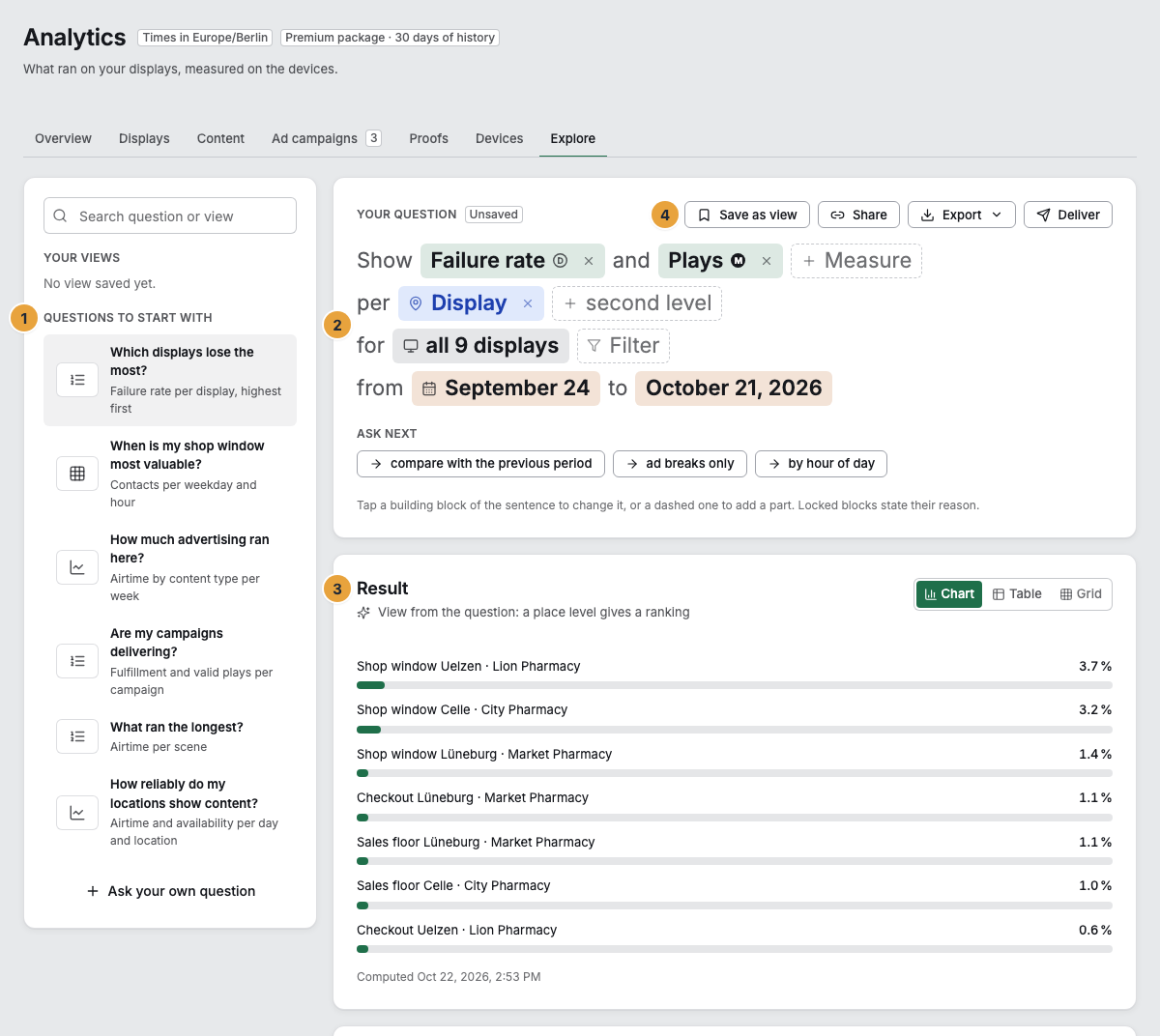
1 Questions to start with · 2 Question as a sentence · 3 Result · 4 Save as view
Options
Questions to start with
| Question | What it shows |
|---|---|
| Which displays lose the most? | Failure rate per display, highest first |
| When is my shop window most valuable? | Contacts per weekday and hour |
| How much advertising ran here? | Airtime by content type per week |
| Are my campaigns delivering? | Fulfillment and valid plays per ad campaign |
| What ran the longest? | Airtime per scene |
| How reliably do my locations show content? | Airtime and availability per day and location |
Under the sentence, Ask next offers variations, for example “per display instead of per location”, “compare with the previous period”, “ad breaks only”, or “per week instead of per day”.
What a question may do
| Rule | Why |
|---|---|
| At most three levels at a time. | Nobody reads more than that. |
| A single play is available only in the log and in the export. | A chart with thousands of plays says nothing. |
| Modeled figures are not available finer than location and hour. | Anything finer would be false precision. |
| Own content and advertising cannot be crossed in one query. | A scene in which a creative runs is two views of the same second. |
| Fulfillment and pacing need an ad campaign as a filter or level. | The commitment is tied to the booking. |
What the measures and levels mean is explained under Read analytics. Above the result, notices appear where needed, such as: The period starts later than asked because your package only reaches back that far. Hourly values no longer exist after 25 months. Contacts from self-reported data are included and estimated.
Save, share, export, deliver
- Save as view asks for a Name and a Period: Sliding, meaning always the last days, or Fixed with the days of the question. Under Visible to, you choose only me or the whole team. Only the person who created a view with only me can see it, along with its files and its delivery. Not even an Owner can get to it. With the whole team, everyone who may see the reports of your organization can find it.
- Share copies a link to the question. It always shows exactly the days of the question, even tomorrow.
- Export outputs the result As CSV or As PDF, with all rows and the class of each column. The table in the portal shows the first 200 rows. The sentence above it states the order: newest first by day, week, or month, in time order by weekday or hour, and otherwise as a ranking by the measure with the largest value first. An organization creates at most three files in ten minutes.
- Deliver sends a saved view regularly: every day, every week on a weekday, or every month on a day from the 1st to the 28th, at a time of day in the time zone of your organization, as CSV or PDF. Delivery goes to the person who saved the view: They receive a notification and an email with the link to the file in the portal. You can turn off the email under Notifications at View delivered.
Every created file remains available for seven days. The page of a view lists them under Created files with Available until. Create now creates a new file with today’s state, Open in analysis opens the question, and Delete view removes it together with its files and ends the delivery.
Check the result
The view appears on the left under Your views, with shared with the team or the rhythm of its delivery. One click asks the same question again, over the most recent days for a sliding period.
If something goes wrong
| Symptom | Meaning | Solution |
|---|---|---|
| “This question cannot be asked like this.” | A building block violates one of the rules above. | The building block states the reason. Remove or change it. |
| “There are no values for this question in the period.” | Nothing was measured for it in the period. | Choose a different period or different filters. |
| “The grid needs two levels.” | The Grid presentation needs two time levels, such as weekday and hour. | Add a second level or choose Chart. |
| “The file from the email is no longer available.” | The seven days are over. | Create now: The new file shows today’s state. |
| “This view no longer exists” | It was deleted, or someone else saved it with only me. | Your other views are in the analysis. A view that is not yours can only be shared by the person who created it: with the whole team. |
| The buttons for saving are missing or grayed out. | Your account lacks the report permissions. | Permissions by role. |
Related
Found what you needed? Then carry on in the portal — or set up an organization first.
Go to the portalTry it free