No access, a grayed-out button, a locked area
A button cannot be pressed or an area is missing from the sidebar: a permission, the package, an agreement, or an open payment.
8 minute readHelpUpdated: 10/25/2026
On this page
Before you start
- For
- Anyone who cannot press a button or cannot find an area.
- Prerequisite
- None. Changing roles and direct permissions requires the Owner role.
- Where in the portal
- Everywhere: the sidebar, buttons, and the No access to this area page
The most common symptom in the portal, and almost never an error. Four causes are possible: a missing permission, a locked package, the agreement, or an open payment.
How to recognize it
Four pictures, four meanings:
- The button is visible but grayed out, and a tooltip gives the reason. You lack the matching permission. The portal only shows or hides buttons on a best-guess basis, and the platform checks every action.
- The area is not in the sidebar at all. Then you lack the read permission. A Member sees far fewer entries than an Owner: five in the default setup.
- In the settings, the row says “Read-only.” You may see the area but not change it. The page shows a notice band, and there is no Save button.
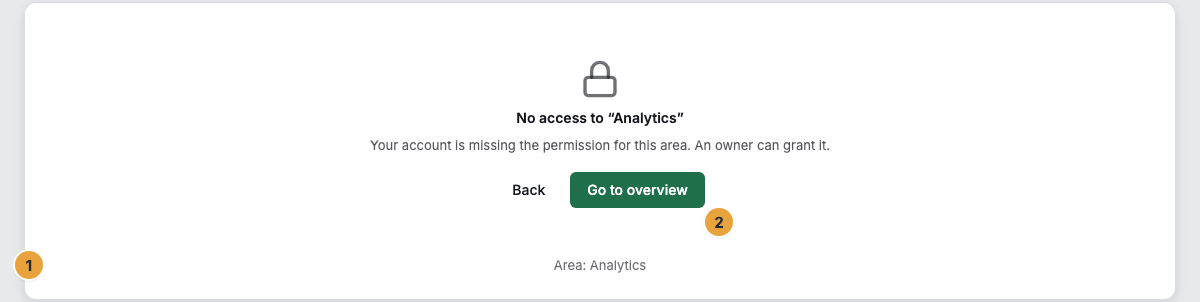
- Entering an address directly in the address bar ends on an explanation page: No access to this area with the text “Your account is missing the permission for this area. An owner can grant it.”, below it Requested: …, Area: …, and Go to overview.
Cause 1: Role and permission
Every account carries exactly one role. On top of that are direct permissions, which allow or deny individually.
| Symptom | Meaning | Solution |
|---|---|---|
| You do not have permission for this. in the tooltip | Your role lacks the permission for this action. | Ask an Owner for the role or a direct permission: Who can do what in the portal?. |
| A Member cannot get to scenes and media | The normal case: Member is deliberately narrow, with only Dashboard, Displays, Apps, Notifications, and Settings. A Member cannot even read content. | Give targeted direct permissions, or use the Content reader template, which bundles read access to media, scenes, playlists, and programs: Create custom roles and grant direct permissions. |
| A Manager sees Team and Billing read-only and cannot install any app | That is exactly where the line is drawn: inviting, assigning roles, changing the package, handling invoices, and installing apps remain Owner matters. | Have an Owner carry out the action: Permissions by role and by area. |
| Someone is not allowed to do something although the role allows it | A Deny direct permission is set on the resource, and a Deny always wins. | Revoke the direct permission: Create custom roles and grant direct permissions. |
| Someone keeps a permission despite a changed role | An Allow direct permission applies in addition to the role. | Revoke the direct permission: Create custom roles and grant direct permissions. |
| You cannot change your own role | Self-protection: otherwise an account could take away its own ability to act. | Ask another Owner: Manage members: change role, block, remove. |
| This is the last owner of the organization. Appoint another owner first. | As long as there is only one Owner, every other target role stays disabled. | First appoint another person as Owner: Manage members: change role, block, remove. |
| This change is reserved for owners. | The action belongs to the administration of the organization. | Have an Owner carry it out: Who can do what in the portal?. |
Which role carries which permission is listed in full at Permissions by role and by area.
Cause 2: The package does not include the function
Next to some areas there is a lock with a note like From Premium or the line Included from the Pro package. This is not an error message and not a permissions problem.
Three rules always apply:
- What is already set up stays. An existing sign-in method, a key, event notifications to your systems that are already set up, your own address, your brand: all of it keeps working and stays visible.
- Cleaning up is always possible. Revoking, removing, switching off, and deleting never depend on the package.
- Creating something new is blocked. That is exactly where the lock is.
You will meet these blocks most often:
| Marking | Meaning | Solution |
|---|---|---|
| Web displays are not enabled for your contract. | The connection type Web browser is not booked. | Book it or pair through a device of your own: Create a web display in the browser. |
| Multiple displays per device are not enabled for your contract. | The second display on the same device is not booked. | Book it or use another device: Add a second display to the same device. |
| Video walls are not enabled for your contract. | Each video wall that is set up is booked individually. No package includes one. | Book a video wall: Change your contract: displays, package, add-ons. |
| This app is only included from a larger package. or This app is paid and must be booked first. | The app’s class is above your package, or it is in no package. | View packages or Book and install: Install or book an app. |
| No further apps can be installed at the moment. | No other app fits. | Uninstall an unused app: Uninstall an app. |
| History from the Pro package or Proofs from the Premium package | Your package does not include this view of analytics. | Compare packages: When numbers are missing or wrong. |
| Playback history starts with Pro on a display’s timeline | Your package records only this many days: Starter none, Pro seven, Premium thirty. | Choose a more recent day: Check what a display is showing now and will show today. |
Next to the lock, View packages leads to Billing. If Not included in your package. appears there, upgrading brings the function with it: What do you pay for: packages, seats, and add-ons?.
Cause 3: Agreement and switch-off
| Marking | Meaning | Solution |
|---|---|---|
| Switched off: “Switched off for your organization.” | We have switched this function off for your organization. A larger package does not change that. | Write to us: Support. |
| Not in your agreement: “Not part of your agreement.” | The function is not in your agreement. Whatever already exists stays usable. | Write to us: Support. |
| No marking at all although you expect one | The contract status could not be retrieved right now. The button stays disabled as a precaution. | Reload the page. If it persists, write to us: Support: where to turn, what to include, and how we help. |
Cause 4: An open payment
If the header says Organization frozen., changes are blocked, but the displays keep running and showing their content. As soon as the open invoice is settled, things continue immediately: Payment reminders, overdue notices, freezing, suspension.
Buttons that are gray for entirely different reasons
Not every gray button is a permissions problem. These five only wait for input:
| Symptom | Meaning | Solution |
|---|---|---|
| Save stays inactive | Nothing to save: you have not changed anything yet. | Change something, and the button becomes active: Messages and banners in the portal. |
| Install stays gray in the dialog | The required consent checkbox is not selected. | Select the checkbox: Install or book an app. |
| Uninstall stays gray for a moment | The dialog first loads the preview of the consequences. | Wait until the preview is there: Uninstall an app. |
| Part of a video wall appears instead of the assignment card | The display belongs to a video wall. Assignments go to the whole wall. | Follow the link to the video wall and assign there: Create a video wall, assign content, and dissolve it. |
| The Enforce company sign-in switch is disabled | A fresh test sign-in is missing. | Start test sign-in: Sign-in, password, and access. |
What you do
- Read the tooltip. It gives the reason: a missing permission, package, or agreement.
- Clarify the role. Ask an Owner for the matching role or a direct permission on exactly the resource in question.
- Check the package. If there is a lock, View packages helps, not support.
- Write to us if Switched off or Not in your agreement is shown. Only we can resolve either of them.
One special case: some apps bring permissions of their own. These appear in the permission catalog only after their installation. Anyone who should use the new function then needs an adjusted role or a direct permission.
Related
- Who can do what in the portal? — roles, direct permissions, and why a Deny always wins.
- Permissions by role and by area — the complete overview for reference.
- Packages, trial, and booked seats — what each package brings.
Found what you needed? Then carry on in the portal — or set up an organization first.
Go to the portalTry it free