Frequently asked questions
Short answers about displays, outages, packages, contract term, data, and billing, before you start and during operation.
8 minute readHelpUpdated: 10/25/2026
On this page
- Sign-in, roles, and language
- Do I need a short code for my organization to sign in?
- Who is “the operator,” and what do they see of our organization?
- Are the portal and the display software available in English?
- Can we see who changed what and when?
- Displays and devices
- Do I need a separate player for every display?
- What counts as a display?
- Which panels fit?
- Can I use my own hardware?
- Can I install my own software on a player?
- What happens during an internet outage?
- What happens after a power outage?
- How do updates reach the device?
- What if a device fails?
- Can I see what a device is doing right now?
- Content, program, and apps
- Is a blank display with the words “Off air” a defect?
- Do I get reports automatically, for example monthly?
- Are apps updated automatically?
- Contract, prices, and data
- Can I try it first?
- Can I change the package?
- Is there a minimum term?
- How does billing work?
- What happens when prices change?
- When is Enterprise worth it?
- What happens to our content if we cancel?
- Where is my data?
- Related
Before you start
- For
- Everyone who sets up or looks after Szenera, and everyone who wants to know beforehand what they are getting into.
- Prerequisite
- None.
- Where in the portal
- Header › Help
The questions asked most often before and after the start, sorted into four topics. Each answer takes two to three sentences. The link behind it leads to the detailed page.
Sign-in, roles, and language
Do I need a short code for my organization to sign in?
No. You only enter your email address and click Continue. The server itself finds which organization and which sign-in methods go with it. If your address belongs to several organizations, you pick one afterwards. See Sign in: password, sign-in link, company account.
Who is “the operator,” and what do they see of our organization?
The operator is the staff who run the platform. They work in a strictly separate interface of their own and see your data only within the scope of their assignment. If someone accesses your portal for a support session, you see that as a band and in the change log. See Support: where to turn, what to include, and how we help.
Are the portal and the display software available in English?
Yes, the portal and the display software come in German and English. You set the language with the switch in the header, or permanently under Settings › My account › Appearance as Display language. See My account: profile, time zone, theme, and language.
Can we see who changed what and when?
Yes. The Change log records every action with Time, Event, Triggered by, and Resource. You can filter it by event type, person, period, and severity. An access by the operator is in it too, marked Impersonation. See Read and export the change log.
Displays and devices
Do I need a separate player for every display?
Not necessarily. The Player Lite drives one display and the Player Pro two, each with its own content, rotation, and program. Billing is per display, not per device. See Add a second display to the same device.
What counts as a display?
Every display that the platform drives. A wall of four displays counts as four, and a player that drives two connectors separately carries two. See What do you pay for: packages, seats, and add-ons?.
Which panels fit?
Any panel with a free HDMI input. An off-the-shelf TV works as well as a panel built for continuous operation, in landscape or portrait. If the panel hangs rotated, you set the rotation once. See Player Lite.
Can I use my own hardware?
For the route without a player, yes: any computer and any smart TV with a current browser can drive a display as a web display. The SzeneraOS operating system exists only on Szenera’s own devices, and only there can updates, remote maintenance, and self-healing be promised. See Web display: a display in the browser.
Can I install my own software on a player?
No. The player is a closed device without a desktop and without an application catalog. Whatever else you want to show, you embed as a web page. See What is SzeneraOS, and why does it run on its own?.
What happens during an internet outage?
The display software keeps running: content, media, and apps are stored on the device. As soon as the network is back, the player fetches the current state. See What happens when the network goes down?.
What happens after a power outage?
The device starts by itself and shows again what it is supposed to show. The display software starts fresh in the process. The “Restore?” question that a browser otherwise asks after a hard shutdown does not come up here. See How does a player keep itself running?.
How do updates reach the device?
By themselves, over the connection that is there anyway. The new system is started on a trial basis. If it does not report as healthy, the device runs the old one again at the next start. See How does a player update itself?.
What if a device fails?
Every player comes with a 12-month warranty. Write to support@szenera.com, and we will sort out the case. Content, programs, and settings are stored in the platform: A replacement device is paired in a minute and shows again what the display showed before. See Troubleshooting on the device.
Can I see what a device is doing right now?
Yes. State, last report, running content, and a current screenshot at the push of a button are in the portal. See Check what a display is showing now and will show today.
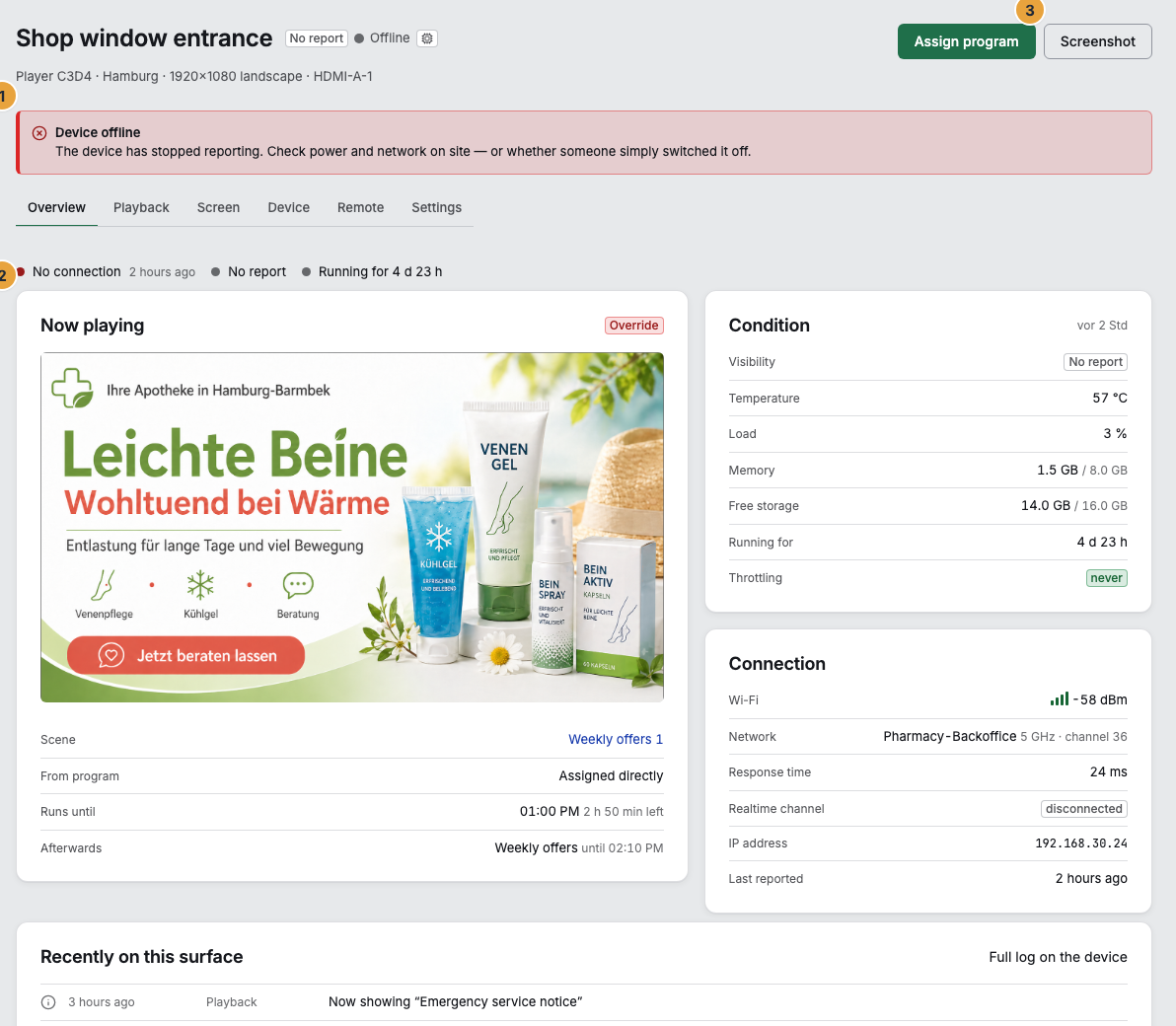
The example shows a display whose device is not reporting right now.
Content, program, and apps
Is a blank display with the words “Off air” a defect?
No. An off-air period is a scheduled blank display that someone set in your program. The display even shows the time at which playback resumes. It has nothing to do with a fault or with maintenance. See Schedule time off air.
Do I get reports automatically, for example monthly?
Yes. A saved view of the analysis can be delivered daily, weekly, or monthly, as CSV or PDF. The file stays retrievable for seven days. See Run your own analysis. Proofs for advertisers are created automatically anyway, every month after the closing: Proofs and links for advertisers.
Are apps updated automatically?
Updates without new permissions are applied silently by the platform. If an update requires additional permissions, the app pauses and asks you through a band. That is why there is deliberately no switch for automatic updates. See When an app update is waiting for your decision.
Contract, prices, and data
Can I try it first?
Yes: 30 days with one display and the full Pro scope, without payment details and without it becoming a contract. Whatever you book beyond that, such as further displays, add-ons, or a larger package, is billed at the regular rate. See Packages, trial, and booked seats.
Can I change the package?
At any time. An increase takes effect from the click and is billed pro rata for the rest of the period. A reduction also takes effect immediately and is credited pro rata, as a balance on the next invoice and not as a payout. See Change your contract: displays, package, add-ons.
Is there a minimum term?
Not with monthly payment. You cancel at the end of the period. The annual contract runs twelve months and is cheaper in return. See Cancel the contract or delete the organization.
How does billing work?
By invoice, in advance for each period. SEPA direct debit and card run through a payment service provider. Account and card details never reach Szenera’s servers. See Invoices, credit notes, and documents.
What happens when prices change?
A running contract keeps its amount: Each item locks in the price at which it was booked. A changeover does not make any existing customer more expensive. See What do you pay for: packages, seats, and add-ons?.
When is Enterprise worth it?
From 30 displays. Then a sign-in of your own, an address of your own, an availability commitment, and a fixed contact person usually come with it, and the price is calculated, not read off a list. See What do you pay for: packages, seats, and add-ons?.
What happens to our content if we cancel?
The cancellation takes effect at the end of the paid period. After that, playback ends on all displays, and your content stays retrievable for another 30 days. Anyone who instead deletes the organization permanently loses displays, media, scenes, access, and logs with no way back, so save beforehand what you want to keep. See Cancel the contract or delete the organization.
Where is my data?
On servers in Germany. The connection to the devices is encrypted. A data processing agreement under Article 28 GDPR exists with every organization. What is legally promised, that is, storage location, data processing, and availability, is stated bindingly in the contract documents: Privacy, Terms, and Data processing in the footer of the website. These docs only restate it and do not replace it.
Related
- What is Szenera, and what do you need for it? — the overview before the first setup.
- What do you pay for: packages, seats, and add-ons? — what a booked seat carries.
- Web display: a display in the browser — the way without a device of your own.
Found what you needed? Then carry on in the portal — or set up an organization first.
Go to the portalTry it free