Schedule time off air
The display should stay empty at certain times without anyone switching off the device.
4 minute readProgramsUpdated: 10/25/2026
On this page
Before you start
- For
- Anyone who plans times without content instead of switching off a display.
- Prerequisite
- The permission to edit programs — by default, the roles Owner and Manager have it. In addition, a created program.
- Where in the portal
- Programs › program › program entry › Content › Off air tab
At the end, the display stays empty at planned times — at night, on an inventory day, outside opening hours. The device keeps running and keeps reporting in.
Steps
Off air as a program entry
- Open the program and create a program entry — by dragging in the weekly plan or through the Program entry button.
- In the Content section, click Change and switch to the fourth tab, Off air. It says: “The display deliberately stays dark during this time. This has nothing to do with a fault or maintenance.”
- Click Choose off air.
- Set the Time and Repeat as for any other entry. For a store's night, that is for example
20:00 – 08:00daily. The dialog adds The window ends on the following day. - Click Save. The portal reports Program entry saved.
Off air as the base program
- If the display should stay dark in the normal case and show something only at planned times, turn it around: click Change in the Base program card, switch to the Off air tab under What should normally run?, and click Choose off air. The portal confirms with Base program changed.
A freshly created program starts with the base program Off air anyway — until you replace it.
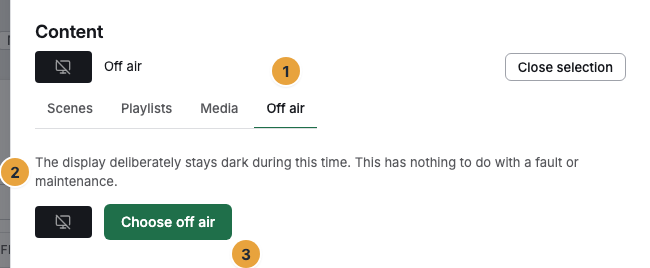
1 Off air tab · 2 Explanatory text · 3 Choose off air button
Options
Off air, maintenance, panel off
Four states are easily mixed up when a display does not show its usual content. They have different causes.
| What | Who sets it | What happens |
|---|---|---|
| Off air | You, in the program | The display stays empty for the planned window, with a resume time. The device keeps running, keeps fetching content, and keeps reporting in. |
| Maintenance | The platform operator | Announced work on the system. A banner with the planned period appears in the portal, and a narrow strip appears on the display. Playback continues. |
| Maintenance on the device | The device itself | Update, restart, or rollback to the previous version. A restart can be triggered by hand through remote maintenance. |
| Turn screen off | You, in the display's record | The panel goes on standby and is dark. The device keeps running. See Adjust a display’s picture and power. |
An off-air period is purely a planning statement. It switches off no device, restarts nothing, and triggers no update. The difference from switching off: off air leaves the display on and shows planned emptiness, whereas switching off darkens the panel. On the device, it can be neither turned off nor skipped — it is changed only here in the program.
Check the result
- In the weekly plan, the entry appears as a block in the color of the content kind Off air.
- On the display, a calm full-screen state appears in the window with the words Off air and the sentence “This display is planned to be empty. Playback starts again at HH:MM.” The time is the end of the window. It comes from the state the device already has. No network is needed for it.
- In the fleet, the display's tile carries the words Broadcast pause instead of a preview, and the status stays Online.
- On the display's Playback timeline, the section appears as Broadcast pause, next to Playing and Nothing scheduled.
- When the window is over, playback restarts on its own.
If something goes wrong
| Symptom | Meaning | Solution |
|---|---|---|
| The display shows Off air although it should run | An off-air period is planned for this time — as a program entry or as the base program. | Open the responsible entry in the weekly plan and change its window or pause it through Do not play for now. If the base program is the cause, replace it through Change. |
| The display stays empty, but without the words Off air | That is not an off-air period. | See When a display does not show what it should. |
| The stated time is missing on the display | No resume time could be read. | Not an error. The first sentence stands alone, and the window still ends as planned. |
| The display still counts as Online although nothing is running | That is by design: off air changes nothing about operation. | Nothing to do. |
Related
Found what you needed? Then carry on in the portal — or set up an organization first.
Go to the portalTry it free