What is a playlist, and when do I not need one?
You have several pieces of content and wonder whether you need a playlist for them or whether the content can go straight onto the display.
4 minute readProgramsUpdated: 10/25/2026
On this page
Before you start
- For
- Anyone who wants to show several pieces of content one after another or is considering a playlist.
- Where in the portal
- Playlists
A playlist is an ordered sequence of scenes and media with a duration for each entry. It bundles several pieces of content into a loop. A single piece of content does not need one.
What is in a playlist
A playlist mixes scenes and media from the library freely: first a scene, then an image, then a video. Each entry carries a duration. Images and scenes stay as long as set. Videos run their natural length unless you enter something else. A scene that was never published may sit in the sequence, but it carries the note Never published — will be skipped on the display.
You decide where the sequence comes from when you create the playlist. The New playlist dialog asks Where should this playlist take its content from? and offers four cards: Manual, Folder, Tags, and OneDrive.
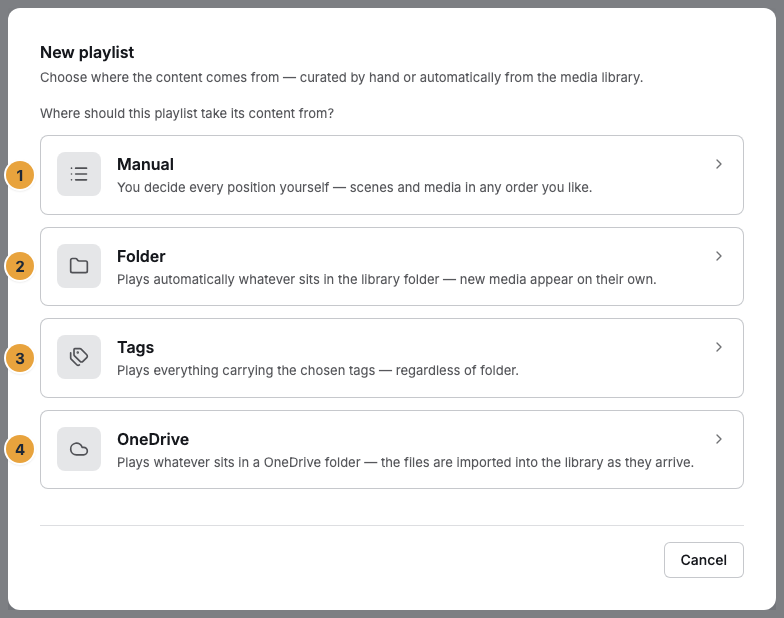
1 Manual · 2 Folder · 3 Tags · 4 OneDrive
Manual, from a folder, by tags
| Kind | Content | Typical use |
|---|---|---|
| Manual | You put the sequence together yourself, scenes and media in any order you like | a restaurant's lunch menu |
| Folder | All playable media of a library folder, kept up to date automatically | a folder called “Promo week”: uploading an image is enough, and it runs on its own |
| Tags | All media that carry all the chosen tags (1 to 10), regardless of folder | everything with sommer and angebot, across the whole library |
For OneDrive, the files of a cloud folder are continuously imported into the media library, and the playlist plays that folder. Your organization needs the “Places in the library” feature for this. If it is missing, the card is locked.
With the automatic kinds, you maintain no entries. New matching media appear on their own, and deleted ones disappear. A media item only plays along once its processing is finished. A playlist with a source carries no sequence of its own, and it has a cap: if more than 200 media match the selection, the rest do not play along. The portal says so under Not the whole selection runs with the addition “a source playlist takes no more”. Entries from a source carry the badge From the source.
Where the playlist sits between scene and display
Between a finished scene and what the display shows lie two decisions: which content runs when, and on which device. A program answers the first, and the assignment at the display answers the second. The playlist comes before both: it can be a base program or a program entry. It can also be assigned directly to a display. Then it runs as a loop, without a weekly plan.

What follows
- A single piece of content needs no playlist. A scene or a media item becomes the base program, a program entry, or the assignment at the display directly.
- If a fixed running order should play, such as welcome, offer, notice, create a manual playlist.
- If a folder “Promo week” should run on its own, choose Folder, Tags, or OneDrive. From then on, the playlist fills itself, up to the cap of 200 media.
- A playlist with a source cannot be reordered by hand. If you want to decide the order, stay with Manual.
Related
Found what you needed? Then carry on in the portal — or set up an organization first.
Go to the portalTry it free