What is a program, and what does the base program do?
You are planning times for the first time and want to know how the base program and program entries work together.
4 minute readProgramsUpdated: 10/25/2026
On this page
Before you start
- For
- Anyone who decides what runs on the displays and when.
- Prerequisite
- Viewing is enough for reading. Creating, editing, and deleting are separate permissions.
- Where in the portal
- Programs
A program describes a weekly rhythm made of two building blocks: the base program for the normal case and program entries at their times. It says what runs when. Where it runs, you decide at the display.
Two building blocks: base program and program entry
The Programs page says it in one sentence: “A program says what runs when. Where it runs is decided on the device.” Behind it are exactly two kinds of building blocks.
| Building block | What it is |
|---|---|
| Base program | The content that runs when no program entry applies. Every program has exactly one, and it is never empty |
| Program entry | A piece of content with a time window and a repeat. In its windows, it sits on top of the base program |
The Base program card in the program editor carries the sentence Runs whenever nothing else is planned. A display with a program is therefore never empty: the question “and what runs otherwise?” always has an answer. A new program starts with the base program Off air. With Change, you choose something else under What should normally run? The base program can only be replaced, never removed.
A program entry is the exception to the normal case: the lunch menu from 11:30 to 14:00, the club night on Thursday, a holiday notice set up with One-off only. A program holds up to 200 program entries. When the cap is reached, the portal reports This program already has the maximum number of program entries. If two entries overlap, a fixed order decides: Which program entry wins when entries overlap?. A window whose end lies before its start runs into the following day: 22:00 to 06:00 is one entry, and the dialog says The window ends on the following day.
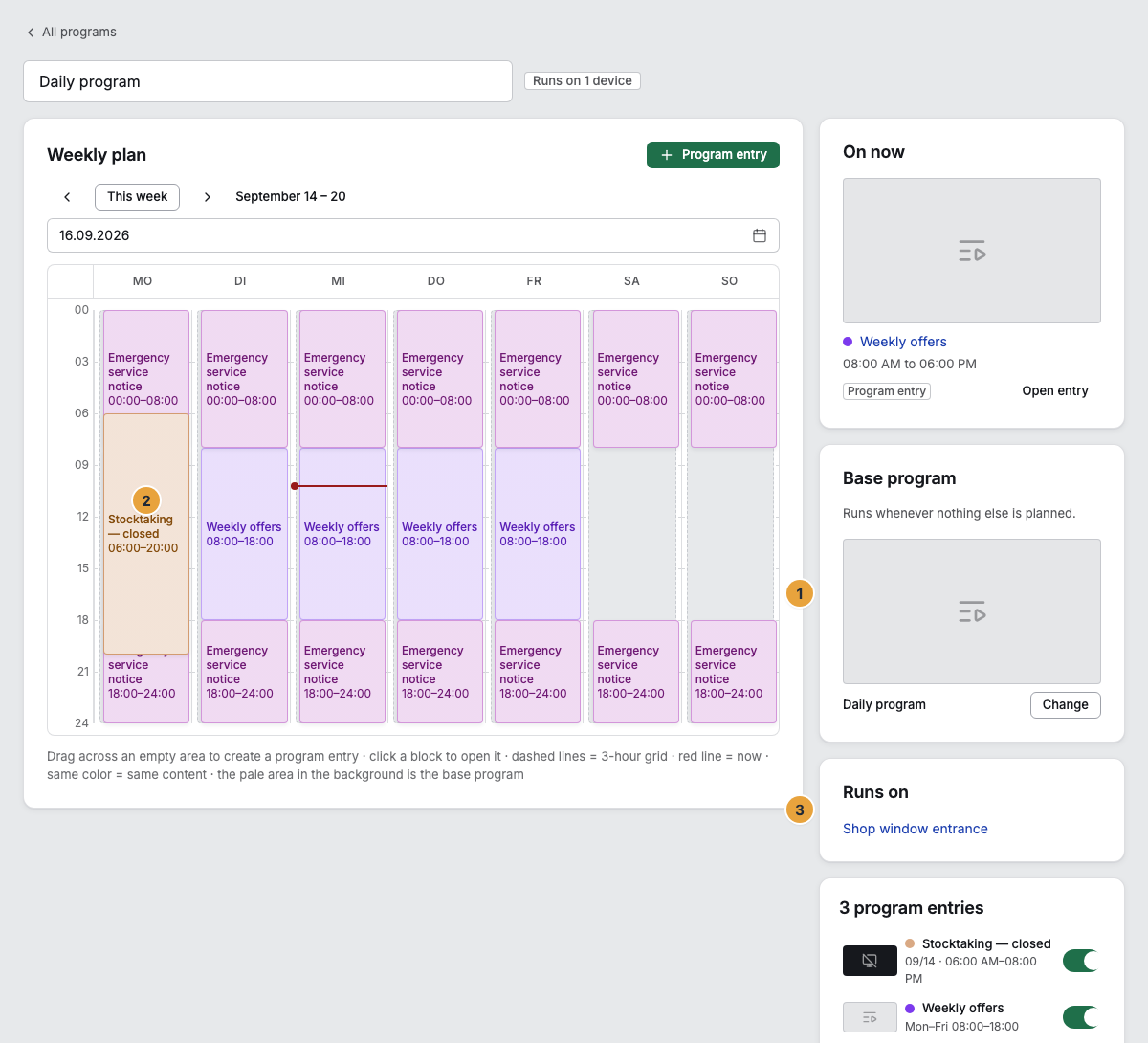
1 Base program card · 2 Program entry as a colored block · 3 Runs on card
Four kinds of content in both places
The same four tabs are available in both places: Scenes · Playlists · Media · Off air.
| Content | What happens on the display |
|---|---|
| Scene | The designed page runs continuously |
| Playlist | The sequence runs as a loop, with the durations of the playlist |
| Media file | A single image or video from the library runs as an endless loop |
| Off air | The display stays dark |
Where a program runs
A program says nothing about where it runs. The assignment happens at the display, and a display carries exactly one program. The same program, however, can run on any number of displays: a practice with three waiting rooms assigns the same program to all three and maintains it once. As long as no display carries it, the Runs on card says Not assigned to any device yet — you assign it on the device.
What follows
- Set the base program first. It is on the display almost all the time, and the program card shows its preview.
- Then create the exceptions as program entries: times when something else applies.
- A program takes effect only when you assign it at the display. For two displays with the same content, one program is enough. For different content, you need two.
Related
Found what you needed? Then carry on in the portal — or set up an organization first.
Go to the portalTry it free