Day windows, midnight, and time zones
A window runs past midnight, applies all day, or your locations are in different time zones.
4 minute readProgramsUpdated: 10/25/2026
On this page
Before you start
- For
- Anyone who plans program entries across midnight, across the whole day, or across several locations.
- Prerequisite
- A program with at least one program entry.
- Where in the portal
- Programs › program › program entry › Time
A time window is read by fixed rules, and the portal calculates in two time zones. Look in the tables for the row that matches your case.
Day windows per program entry
A program entry carries a set of windows, not a single span.
| Rule | What applies |
|---|---|
| Number of windows | Up to eight day windows per program entry |
| Overlap within an entry | Not allowed — the windows of one entry must not overlap each other |
| What the dialog edits | Exactly one window |
| Split day (this in the morning, that in the afternoon) | Usually two program entries, and that is exactly how it reads in the weekly plan |
| Entry with several windows | The windows stay untouched as long as you do not touch the Time, and the box This program entry has special times points this out |
| Entry with a monthly repeat | The same box: “Neither can be edited here and both stay untouched — until you change the time or the repeat. Then what you picked here applies.” |
| All day (24 h) | Sets exactly one window from 00:00 to 00:00 — a full 24 hours, not 23:59. There is no gap between two consecutive days |
| Grid of the time fields | 15 minutes |
| How the kind of repeat is determined | Derived, never chosen: all seven days result in daily, a subset in weekly, and a Date of the appointment in one-off |
Windows across midnight
If the end lies before or on the start, the window ends on the following day. 22:00 to 06:00 is therefore a single program entry.
| What you see | What it means |
|---|---|
| A moon icon below the time fields with The window ends on the following day. | The window extends past midnight. |
| The chosen weekday | The day of the start counts. “Friday, 22:00–06:00” runs from Friday 22:00 to Saturday 06:00 — not on Saturday evening. |
| Two slices in the weekly plan (22:00 to 24:00 and 00:00 to 06:00) | The same intention, shown split at the day boundary. |
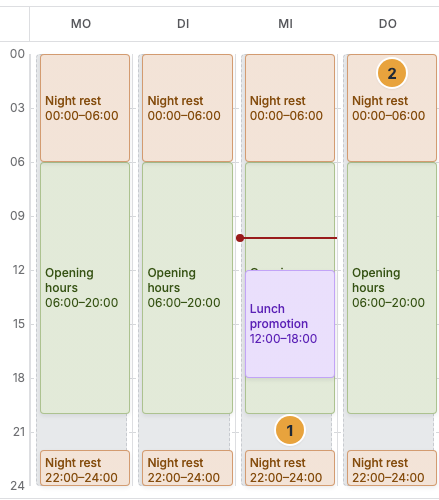
1 Slice 22:00–24:00 on the start day · 2 Slice 00:00–06:00 on the following day
Which time zone applies where
The portal knows two time zones: the organization's and your own.
| Where | Which time zone | How you can tell |
|---|---|---|
| Program times and weekly plan | The organization's time zone | The footnote in the program entry dialog, for example All times in Europe/Berlin. |
| Default time zone of the organization | Adjustable under Settings › Company details, field Default time zone | “Basis for schedules and dates for all members.” |
| Appointments and logs in your view | Your own time zone from Settings › Profile, field Time zone | “Determines the time in which appointments and logs are shown to you.” |
| Summaries by email | The organization's time zone | They go out at 8:00 a.m., daily or on Mondays, respectively. The note under Notifications calls it “your time zone”. The organization's time zone is the one that counts. |
| Analytics and proofs | The time zone in which days and hours were read | The Analytics area shows the line Times in …. Every proof names its Time zone in its details. |
| The player's clock on site | Fetched from the network | If the device time runs without synchronization, the portal reports the incident Clock out of sync: “The device clock runs without synchronization. Schedules will switch at the wrong moment.” |
Two consequences of this split: A program for locations in different time zones switches everywhere by the organization's time, not by the local time of the display. And a display with a wrong clock changes at a different moment than its neighbors — this is most noticeable on a video wall, whose members calculate the same timeline.
Related
Found what you needed? Then carry on in the portal — or set up an organization first.
Go to the portalTry it free