What happens when the network goes down?
Why a display without internet keeps playing, what Online, Delayed, and Offline actually mean, and when the “last known content” notice appears.
4 minute readGetting startedUpdated: 10/25/2026
On this page
Before you start
- For
- everyone who has to interpret a status in the portal or assess an outage on site
- Prerequisite
- a paired display in your organization
- Where in the portal
- Displays, Status column
A display without internet does not go dark: It keeps playing what is stored on the device. Online, Delayed, and Offline measure only the age of the last check-in, and a notice about the last known content appears only late.
The content is stored on the device
The device fetches its display state from the platform and also stores it locally. If the line drops, it keeps serving the display software from this local supply, and on site the outage stays invisible.
There is one limit: A device that has never loaded a state cannot show anything without a network.
What the status actually measures
Every device sends a check-in every 30 seconds. The three status values only calculate how old the latest one is.
| Status | Derived from | What it does not tell you |
|---|---|---|
| Online | last check-in younger than 60 seconds | whether the content shown is the right one |
| Delayed | last check-in 60 seconds to 5 minutes old | whether anything is visible at all |
| Offline | last check-in older than 5 minutes | whether the display is dark |
So a display can say Offline and still run flawlessly. The tile keeps its picture, and the line Last seen … names the last report.
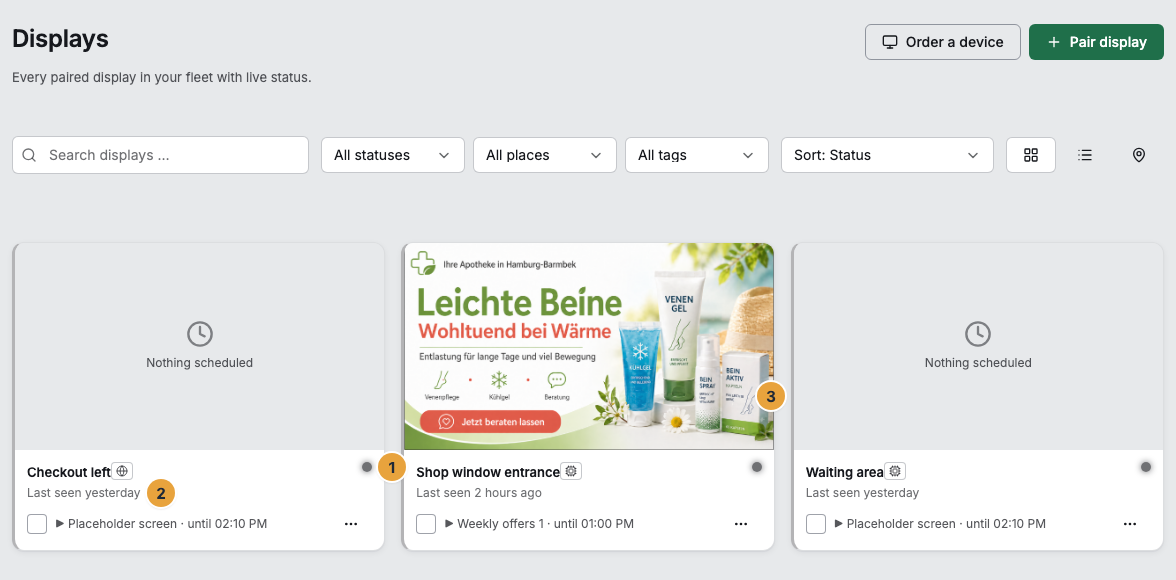
When the notice about the last known content appears
The display state has a deadline. As long as it has not passed, the content counts as covered, with a network or without one. Only when the deadline has passed and no connection is established for 60 seconds does a calm, dark notice appear, small at the bottom right:
No connection — showing the last known content
It is not warning red, and it is not at the top: The device is not defective, it only shows an older state. In the portal, the same appears in the display’s events: The display is now showing older content — no connection and the cache has expired, and on return The content on screen is covered again.

Only beyond the deadline and without a network does “current” turn into “last known.”
When the connection comes back
As soon as the network is up again, the device fetches the current display state. Changes from the meantime appear on their own, with no command and no restart.
The numbers are not lost either. A device without a network keeps measuring and sends its measurements retroactively for up to three days. In Analytics, such hours carry the mark reported late.
If your own connection fails, the portal reports No connection: You are seeing the last known state. Changes are possible again once the network is back.
What follows
- Offline is a statement about the report, not about the picture. Check the tile first before you send someone to the display.
- A brief dropout needs no reaction: Delayed disappears with the next check-in.
- Feel free to publish while a display is offline. The state waits and arrives at the next contact.
- Gaps in Analytics still close for up to three days. A report directly after an outage can be incomplete.
Related
Found what you needed? Then carry on in the portal — or set up an organization first.
Go to the portalTry it free